
Count inventory with RFID.
Count tagged items by location, then review differences before updating stock records.
Example scenario
A cycle count in a retail stockroom
Items are tagged once on arrival. Staff then count a whole stockroom by walking the aisles, and the stock record is reconciled the same day.
How it works
Tag on arrival
The desktop printer prints and encodes a label for each item; the chip ID is read back so every tag is verified before it goes on the shelf.
Count by walking the aisles
A handheld reader captures every tag within range, aisle by aisle. No line of sight or scanning item by item.
DERAS cleans the reads
Repeated reads are removed, each EPC is decoded to its product and serial, and reads are grouped by count session and location.
The stock record is reconciled
The ERP or WMS receives counted versus expected quantities, with missing and unexpected items listed for review.
Hardware in this scenario
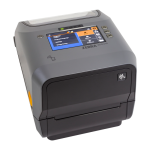 Zebra ZD621RPrints and encodes RFID labels at the tagging station.View
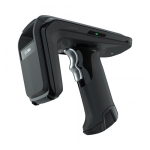 Zebra RFD40UHF sled for fast aisle-by-aisle counts.View
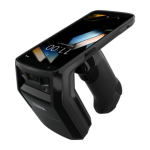 Zebra TC22RHandheld with built-in RFID and barcode.View
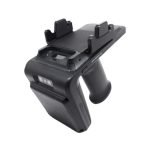 Chainway R6RFID sled for an existing phone or PDA.View
An illustrative scenario, not a customer deployment. Devices, events and connections to your systems are agreed for each project.
Technical example: data and integration

This is an illustrative flow. Device support, event fields and connections must be confirmed for your project.
Possible DERAS role
- Filters repeated reads from each reader
- Decodes GS1 EPCs (for example SGTIN-96) to product and serial
- Verifies encoded tags by reading back the chip ID
- Sends one count result per session to your system
Illustrative events
rfid.tag_encoded{"epc":"3034257BF400B780000186A0","tid":"verified"}rfid.tag_read{"reader":"RFD40-DEMO","session":"CC-0929","count":1284}inventory.count_submitted{"location":"Stockroom A","missing":6,"unexpected":2}
Agree the event format, delivery method and system interface during project scoping.
Check before a pilot
- Hardware
- Choose tags and readers for your materials, site and process. Explore options
- Integration
- Agree data mapping and interfaces; confirm device support and DERAS outputs.
- Validation
- Test real items, read zones, repeated reads and exceptions at your site.
Start with what you need.
Discuss an operational challenge, or send the model and quantity you need.